

Description
Simplify JSON Localization with Secure, Client-Side Translation
Is the software compatible with Windows and Mac?
The software is compatible with both Windows and Mac operating systems, as specified in the provided information.
Is the software safe to use?
Yes, the software operates entirely on the client side, meaning no data is transmitted to external servers. This ensures user data remains private and secure during the translation process.
How often are updates released?
Specific update frequency was not provided. However, the software is currently at version 1.0, indicating it is in a stable release state.
What type of license does it use?
The software is offered as free to use, with no licensing fees or restrictions mentioned in the provided details.
Can I use this tool offline?
Yes, since the software runs entirely on the client side, it does not require an internet connection to function once installed. All processing occurs locally on the user’s device.
Overview
The software is designed to streamline the process of translating JSON files for localization purposes, particularly for teams that rely on external translators who may not be familiar with JSON syntax. It addresses a common pain point in software development and content localization: the need to communicate translation tasks clearly without requiring translators to understand complex data structures. By providing a clean, intuitive interface, the tool enables non-technical users to work directly with JSON content, focusing only on string values while preserving the integrity of objects and arrays.
Target users include developers, localization managers, and content teams working on multilingual applications, websites, or software products. The tool is especially useful when managing frequent updates to localized content, as it supports merging existing translations with new source files. This reduces redundancy and ensures consistency across versions. Real-world usage scenarios include updating app strings after a feature release, maintaining language-specific content for global audiences, or preparing content for international markets without requiring technical expertise from translators.
The developer did not provide additional background information. However, the software’s design suggests a focus on simplicity, security, and usability. It is intended for use in environments where data privacy is critical, and where rapid iteration between development and translation cycles is necessary.
Key Features & Capabilities
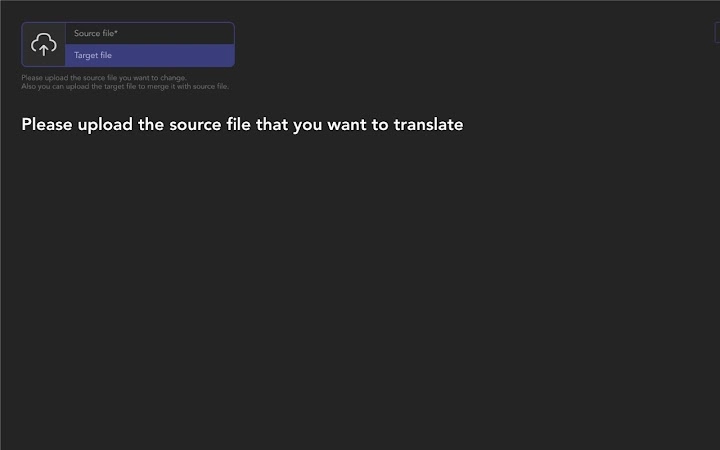
- JSON File Upload and Parsing – Users can upload a JSON file, which is then parsed and displayed as a structured list of translatable string fields. Non-string values such as numbers, booleans, or nested objects are preserved as-is and remain invisible to translators, preventing accidental edits.
- Translation Merge Functionality – When a new version of the source file is released, users can upload the updated file alongside the previously translated version. The tool identifies matching keys and replaces existing translations with new content, preserving unchanged strings and minimizing rework.
- Search and Edit Tools – A built-in search feature allows users to quickly locate specific keys or identify typos and errors in translated strings. This improves efficiency during quality checks and enables rapid corrections without navigating through large files.
- Client-Side Processing – All operations occur locally within the user’s browser or application environment. No data is sent to external servers, ensuring that sensitive content remains secure and under user control at all times.
These features collectively support a streamlined workflow for managing multilingual content. For example, a developer can upload a source JSON file, share it with a translator via a simple interface, and later merge the translated output with a revised source file. This reduces the risk of errors and accelerates the localization cycle.
User Interface, Workflow & Performance
The user interface is designed around clarity and ease of navigation. After uploading a JSON file, users are presented with a list of translatable keys and their corresponding values, displayed in a clean, tabular format. The layout supports quick scanning and editing, with minimal visual clutter. Navigation is straightforward, relying on standard controls such as upload buttons, search bars, and action buttons for merging and exporting.
Workflow efficiency is enhanced by the tool’s ability to handle common localization tasks in a single session. The process begins with uploading the source file, proceeds through translation or merging, and concludes with the export of the final localized JSON. The tool does not require users to install additional software or configure complex settings, making it accessible even to non-technical team members.
Performance observations are based on general software behavior patterns. The developer did not specify resource usage details. However, given the client-side operation and the file size of 5.6 MB, the application is expected to load quickly and operate smoothly on modern systems. Stability is assumed to be consistent with standard desktop applications of similar scope.
Compatibility & System Requirements
The software is compatible with both Windows and Mac operating systems, as stated in the provided information. It is available in version 1.0 and has an installation size of 5.6 MB, indicating a lightweight footprint. The developer did not provide additional system requirements, such as minimum CPU, RAM, or disk space specifications.
Exact system requirements were not listed. Compatibility information was partially provided. Users should ensure their devices meet general standards for running desktop applications, particularly those involving file processing and browser-based execution.
Pros and Cons
Pros
- Secure, client-side processing ensures data privacy and no external data transmission
- Intuitive interface simplifies JSON translation for non-technical users
- Supports merging translations with updated source files for efficient updates
- Search functionality enables quick error detection and correction
- Free to use with no licensing restrictions
Cons
- Limited to translating string values; complex data types are not editable
- No information provided on advanced features like version history or collaboration tools
- Exact system requirements were not specified
- May require users to manage file exports manually
Final Thoughts + CTA
This tool offers a practical, secure, and efficient solution for teams managing JSON-based localization workflows. Its client-side architecture eliminates data privacy concerns, while its straightforward interface lowers the barrier for non-technical translators. The merge functionality and search tools significantly improve productivity, especially in fast-paced development environments.
While the software lacks detailed documentation on advanced capabilities, its core features are well-aligned with real-world needs. Developers, localization specialists, and content managers seeking a reliable, free tool for handling multilingual JSON content will find it highly beneficial.
Download JSON Localization Tool now
Guides & Tutorials for 4Translators Extension for Chrome
How to install 4Translators Extension for Chrome
- Click the Preview / Download button above.
- Once redirected, accept the terms and click Install.
- Wait for the 4Translators Extension for Chrome download to finish on your device.
How to use 4Translators Extension for Chrome
This software is primarily used for its core features described above. Open the app after installation to explore its capabilities.
User Reviews for 4Translators Extension for Chrome 0
No reviews found





